

Security and Availability
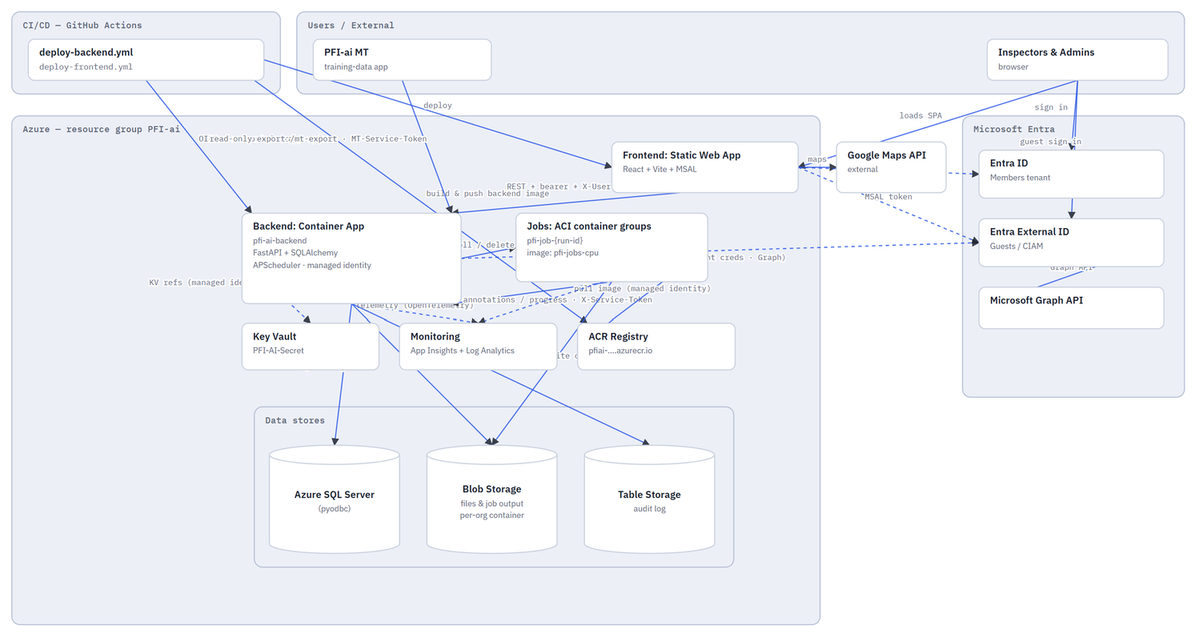
PFI-ai is hosted on Microsoft Azure and uses managed identities, Azure Key Vault, Microsoft Entra authentication and tenant isolation to protect platform access and customer data. Its scalable architecture supports changing inspection and processing workloads.
The entire cloud infrastructure is defined and controlled through Bicep infrastructure-as-code (IaC), providing a consistent, repeatable and auditable deployment baseline. On every deployment, the platform configuration is validated against the defined infrastructure, including permissions, identities, accounts, role assignments and access controls, helping prevent configuration drift and unintended changes to the security model.
Azure Application Insights continuously monitors application performance, availability and diagnostics against a defined and measured service-level agreement. Microsoft Defender for Cloud continuously monitors the application and its supporting Azure resources for security risks and regulatory compliance, including assessment against the Microsoft Cloud Security Benchmark (MCSB). Identified vulnerabilities, configuration issues and compliance deviations can therefore be detected and addressed as part of the platform's ongoing security-management process.
PFI-ai is also supported by a documented disaster recovery and business continuity plan designed to protect the availability and integrity of customer and inspection data. This includes regular backups and separate off-site, immutable backup copies that cannot be altered or deleted through normal application operations, providing an additional layer of protection against accidental deletion, corruption, cyber incidents and other major service disruptions.
Together, these controls provide a controlled, continuously monitored and recoverable cloud environment for inspection data and support PFI-ai's approach to security, traceability, operational resilience and regulatory compliance.


